Public beta · v1.0.0-beta.2

Switch less. Build more.

One Claude Code plugin that keeps Slack, Gmail, Calendar, GitHub and Jira in one quiet inbox, and adds the safety and visibility tools you wish Claude Code had: holds for risky commands, a live file tree, replay, agents and more.

Free and open source (MIT) · Claude desktop app · Terminal support coming next · runs entirely on your machine

Features

Eight tools. One switch each.

Every feature is separate. Turn each on or off from one pane with /switchboard. Coding sessions stay quiet: only what truly needs you shows up.

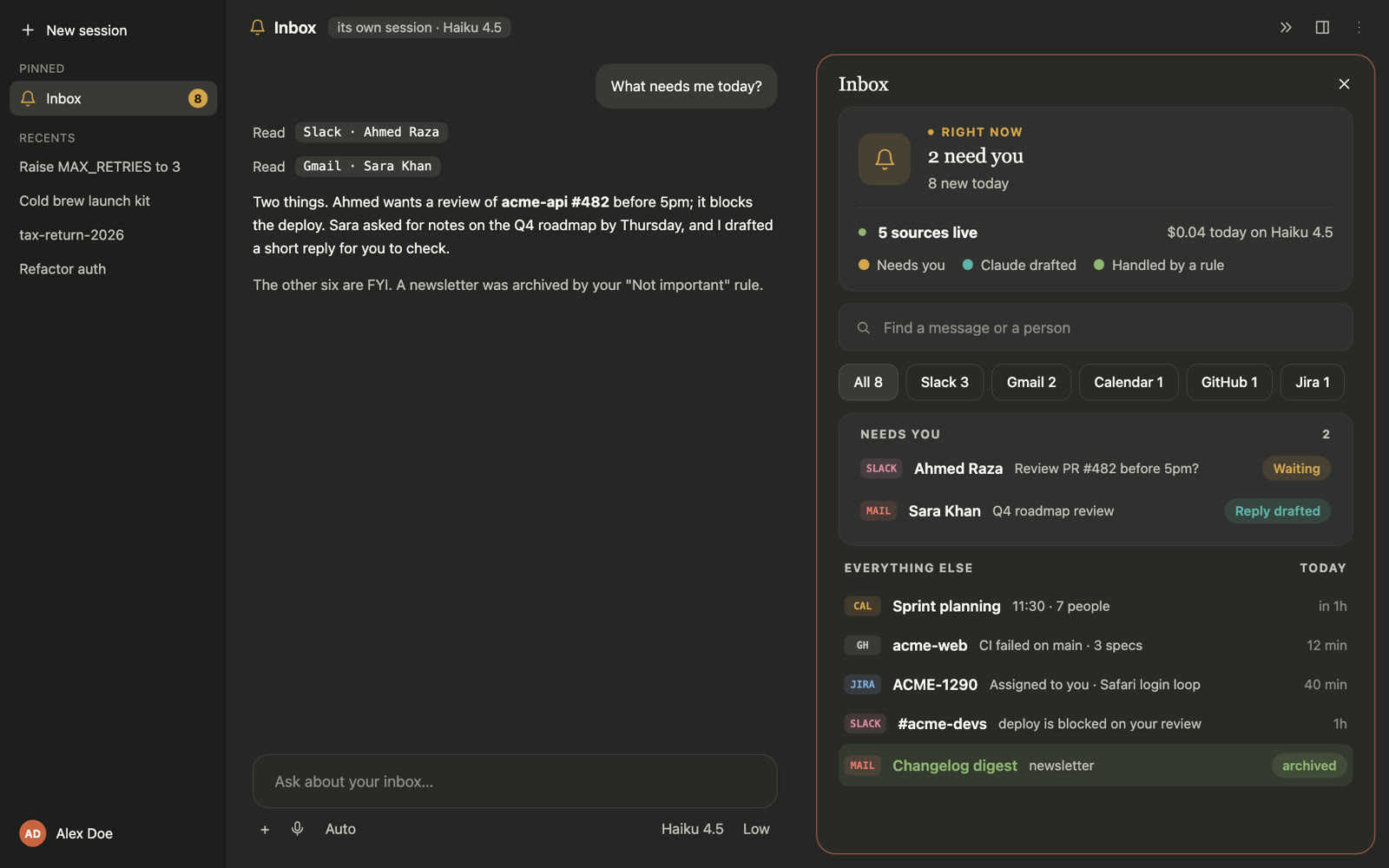
The Inbox session in the Claude desktop app
01Inbox/sb-inbox

Every message that matters, in one quiet list.

Slack, Gmail, Calendar, GitHub and Jira land in one color-coded list behind a bell. Coding sessions stay quiet: only what truly needs you shows above the prompt.

  • Three drafted replies (short, detailed, a question) on Haiku
  • Send with a 5 s Undo; never twice, never to the wrong person
  • Meeting cards 5 min, 1 min and at the start, with Join
All commands 5
  • /sb-inboxOpen the Inbox in the side pane.
  • /sb-inbox hereMake this session your Inbox session: drafts, sends and Auto run here.
  • /sb-inbox sourcesSee each source’s status, and connect or fix one.
  • /sb-inbox demo on | offTry it with made-up messages; nothing is sent.
  • /sb-inbox restartStart checking your sources again.
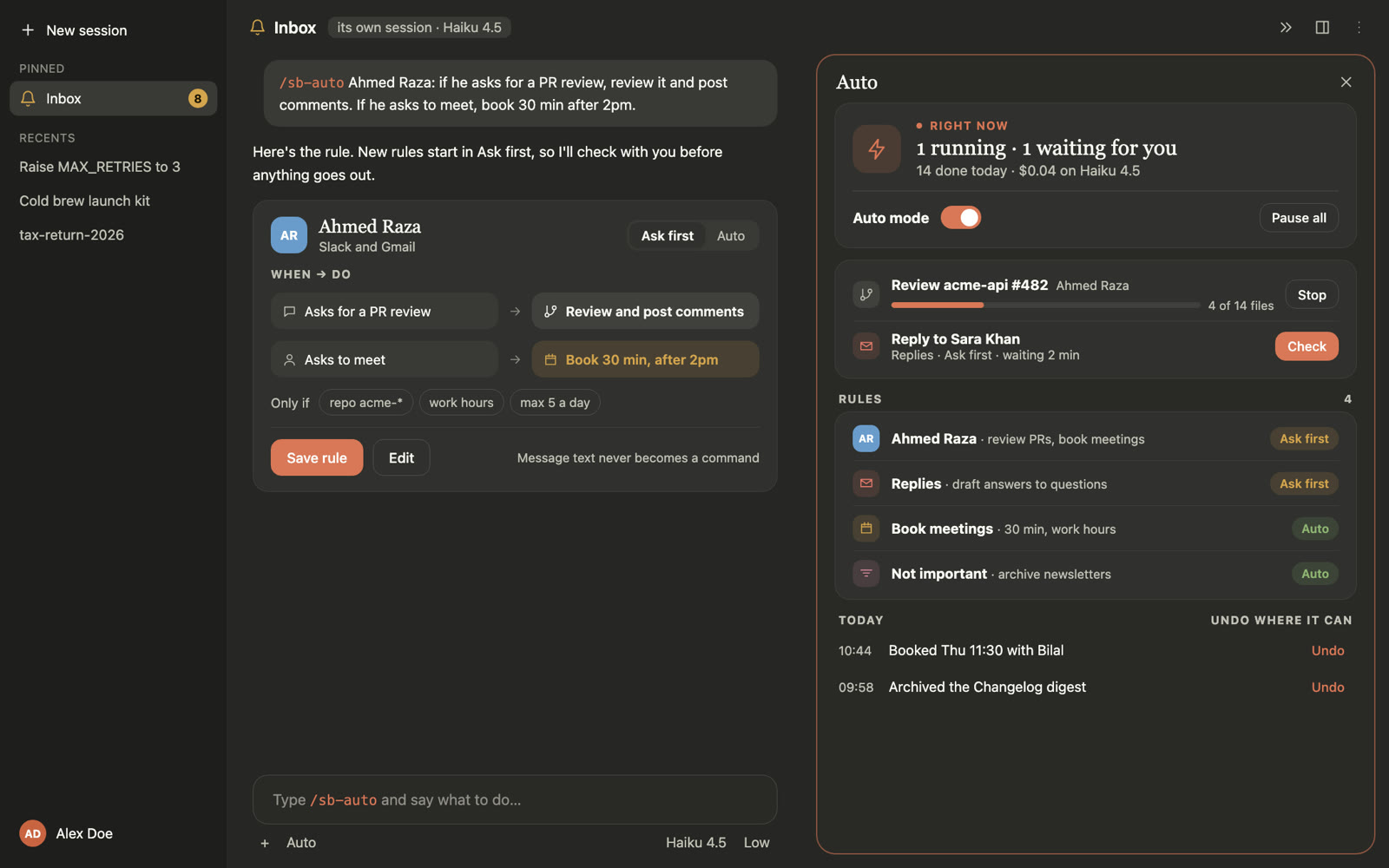
Auto rules in Switchboard
02Auto rules/sb-auto

Rules in plain words. You stay in charge.

Tell the chat what to handle — "reply to Sara when she asks about the roadmap" — and Switchboard turns it into a rule you can read and switch.

  • Ask first by default: you check each action before it goes
  • Acts alone only for a person you named, under a daily cap
  • Every action is logged, most with Undo
All commands 6
  • /sb-auto Sara: if she asks about the roadmap, replyMake a rule in plain words; it starts in Ask first.
  • /sb-auto rulesOpen the Auto pane: your rules, waiting checks and recent actions.
  • /sb-auto delete 1Delete a rule by its number in the list (or by name).
  • /sb-auto on | offTurn Auto on, or off so rules wait and nothing is matched.
  • /sb-pause 1hPause every rule and running task for a while; no time pauses until you resume.
  • /sb-auto resumeStart Auto again after a pause.
Files in Switchboard
03Files/sb-files

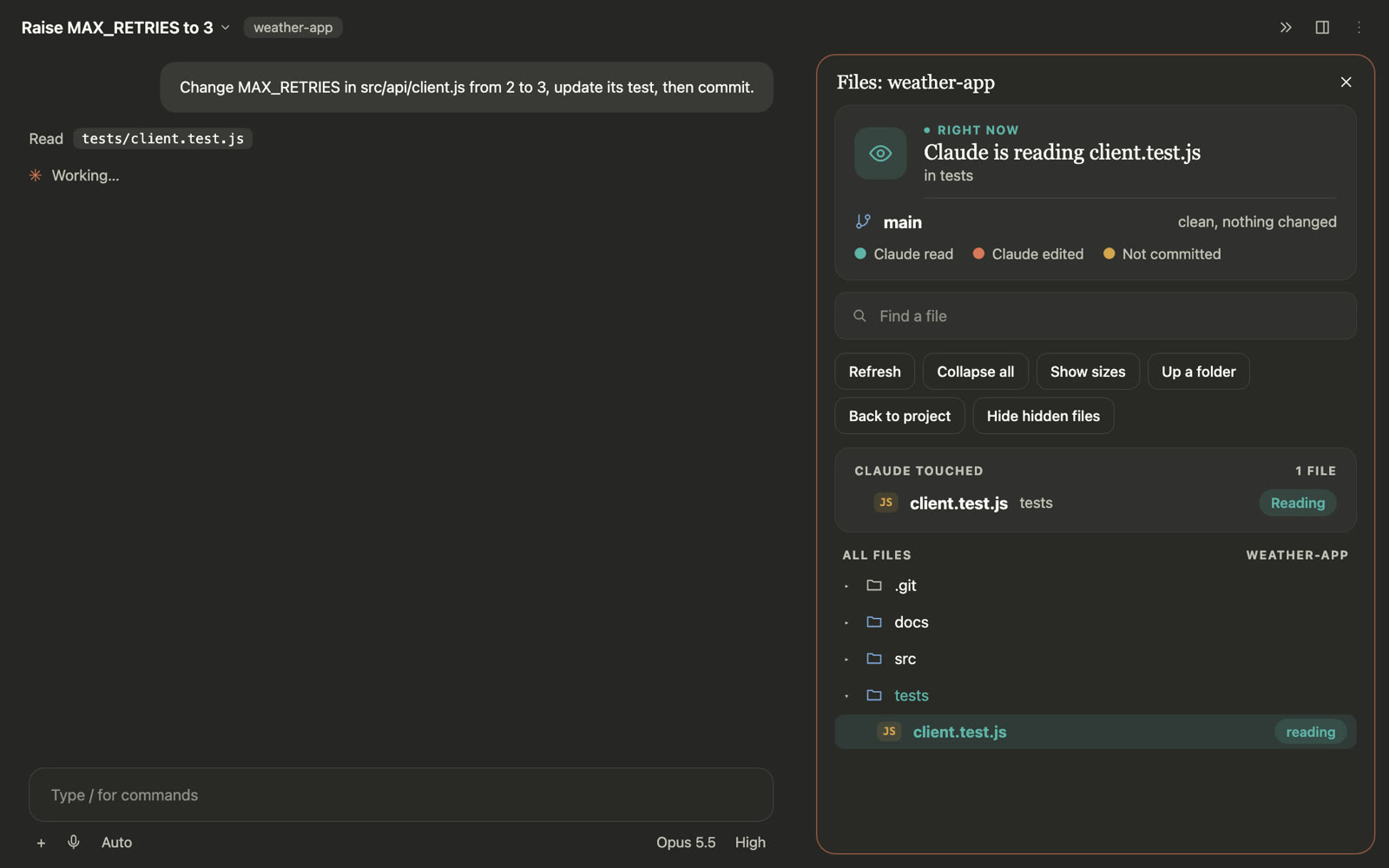
See what Claude reads, edits and commits.

A live file tree opens by itself while Claude works, highlights each file it touches, and closes when the turn ends.

  • Reading, edited and new files marked as they happen
  • Commits, pushes and PRs in the footer
  • Find a file, sizes, and subagent edits
All commands 3
  • /sb-filesOpen the live file tree of this project.
  • /sb-files src/appOpen the tree at a folder.
  • /sb-files auto on | offOpen by itself while Claude works, or only when you ask.
Replay in Switchboard
04Replay/sb-replay

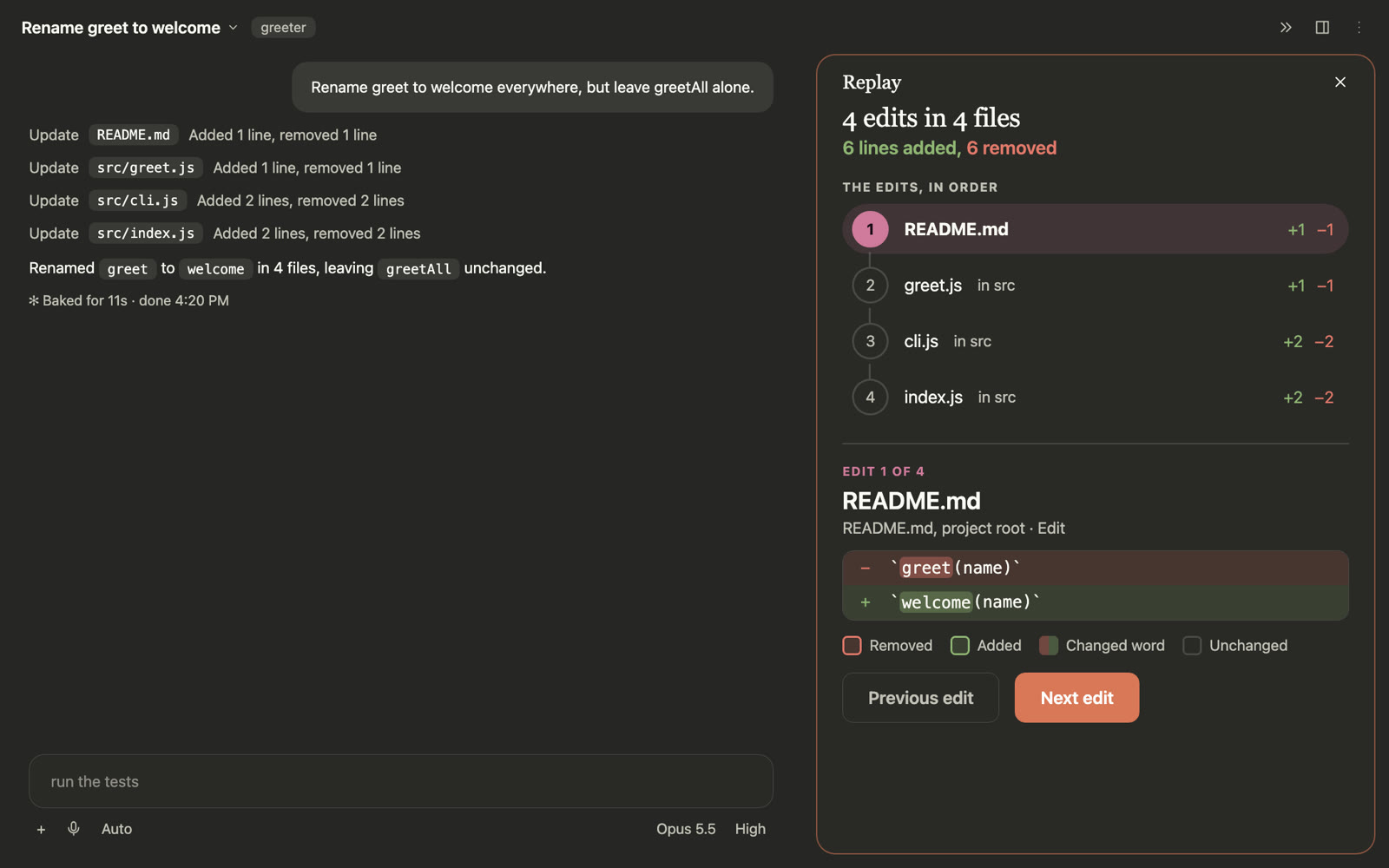
Every edit, step by step.

Walk through the last turns one edit at a time, with the changed words marked — and see what you changed yourself.

  • The last 3 turns, kept across sessions
  • Word-level diffs, git diffs, notebook cells
  • Previous / Next with the keyboard
All commands 2
  • /sb-replayStep through the last turn’s edits, one at a time.
  • /sb-replay 2Replay an earlier turn (the last 3 are kept).
Blast Radius in Switchboard
05Blast Radius/sb-blast

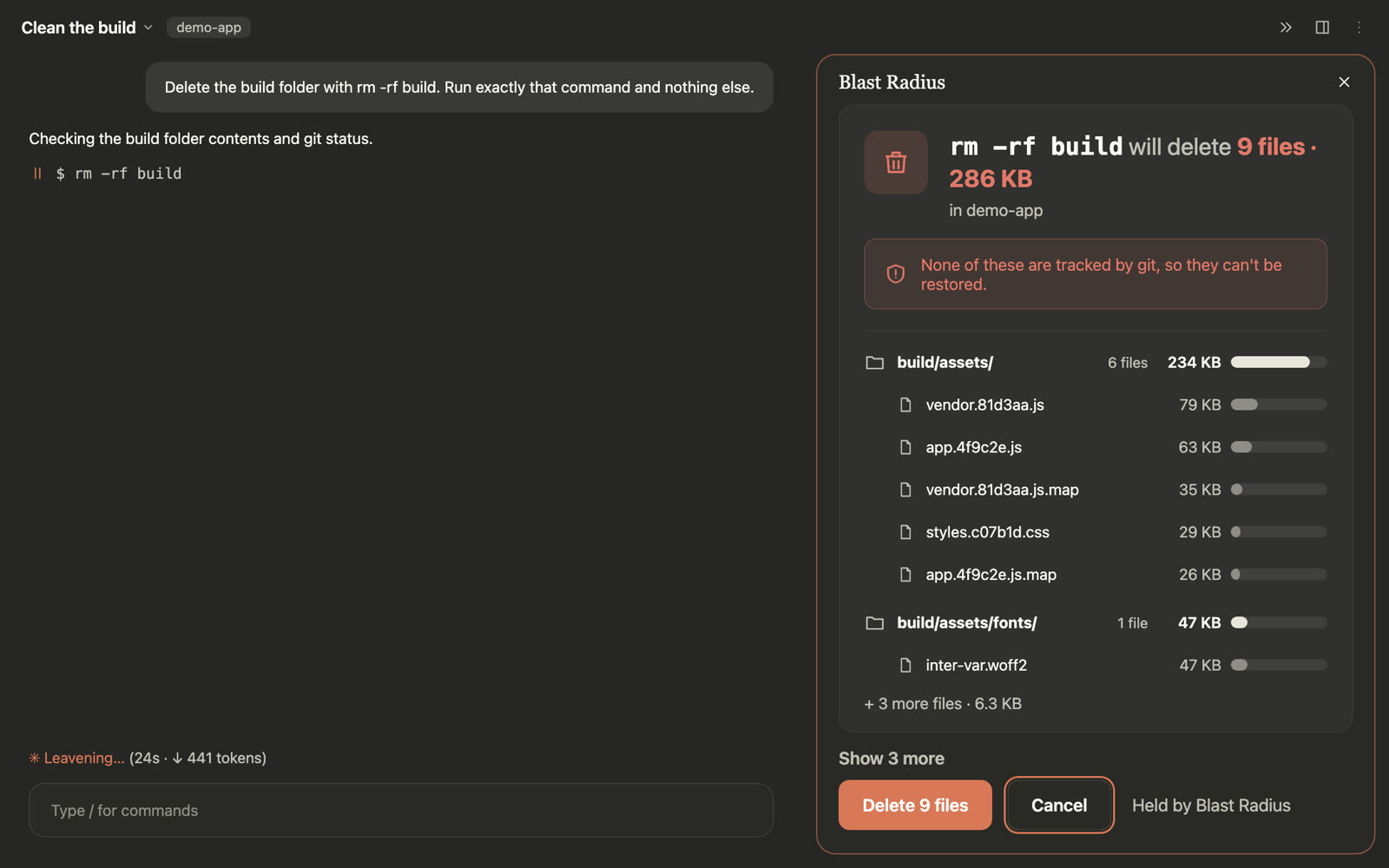
Look before it deletes.

Commands like rm -rf, git reset --hard or git clean are held and measured first, so you see exactly what they would remove.

  • Files, sizes and what git can't restore
  • Run or Cancel; runs by itself after 1 min unless you choose
  • Never two holds at once; fails safe on any error
All commands 5
  • /sb-blastThe held command, if any, and recent history.
  • /sb-blast wait 1mHow long a held command waits before it runs by itself.
  • /sb-blast wait noneHeld commands wait until you choose Run or Cancel.
  • /sb-blast off 1hStop holding commands for a while.
  • /sb-blast onHold risky commands again.
Agents in Switchboard
06Agents/sb-agents

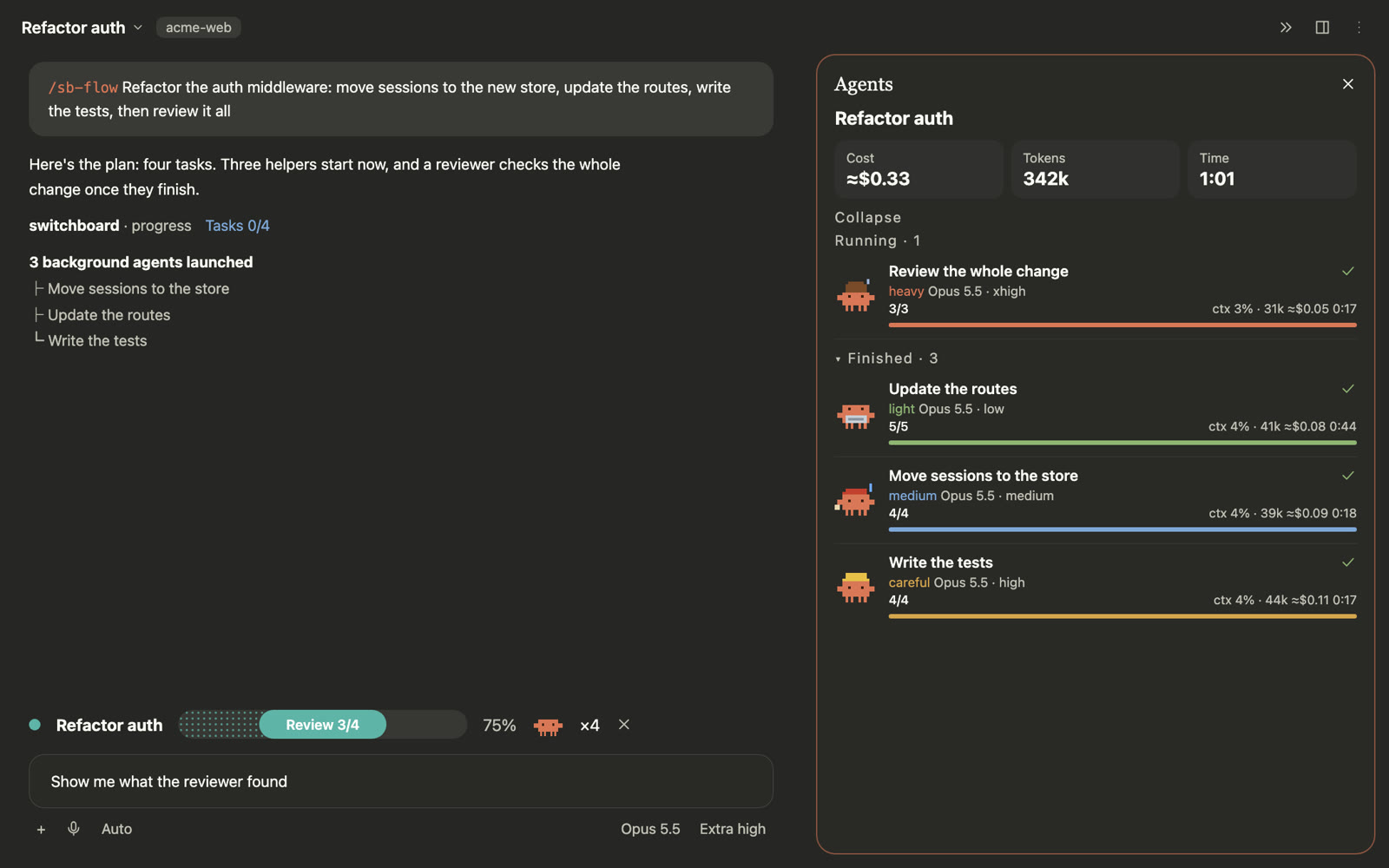
Every subagent, live.

When Claude starts subagents, a pane shows each one's steps, model, tokens, time and cost — and closes when they finish.

  • Progress per agent and for the whole run
  • Cost and context use as they go
  • Display only: no extra model calls
All commands 1
  • /sb-agentsOpen the live view of running subagents: steps, model, tokens, time and cost.
Reflect in Switchboard
07Reflect/sb-reflect

Correct Claude once.

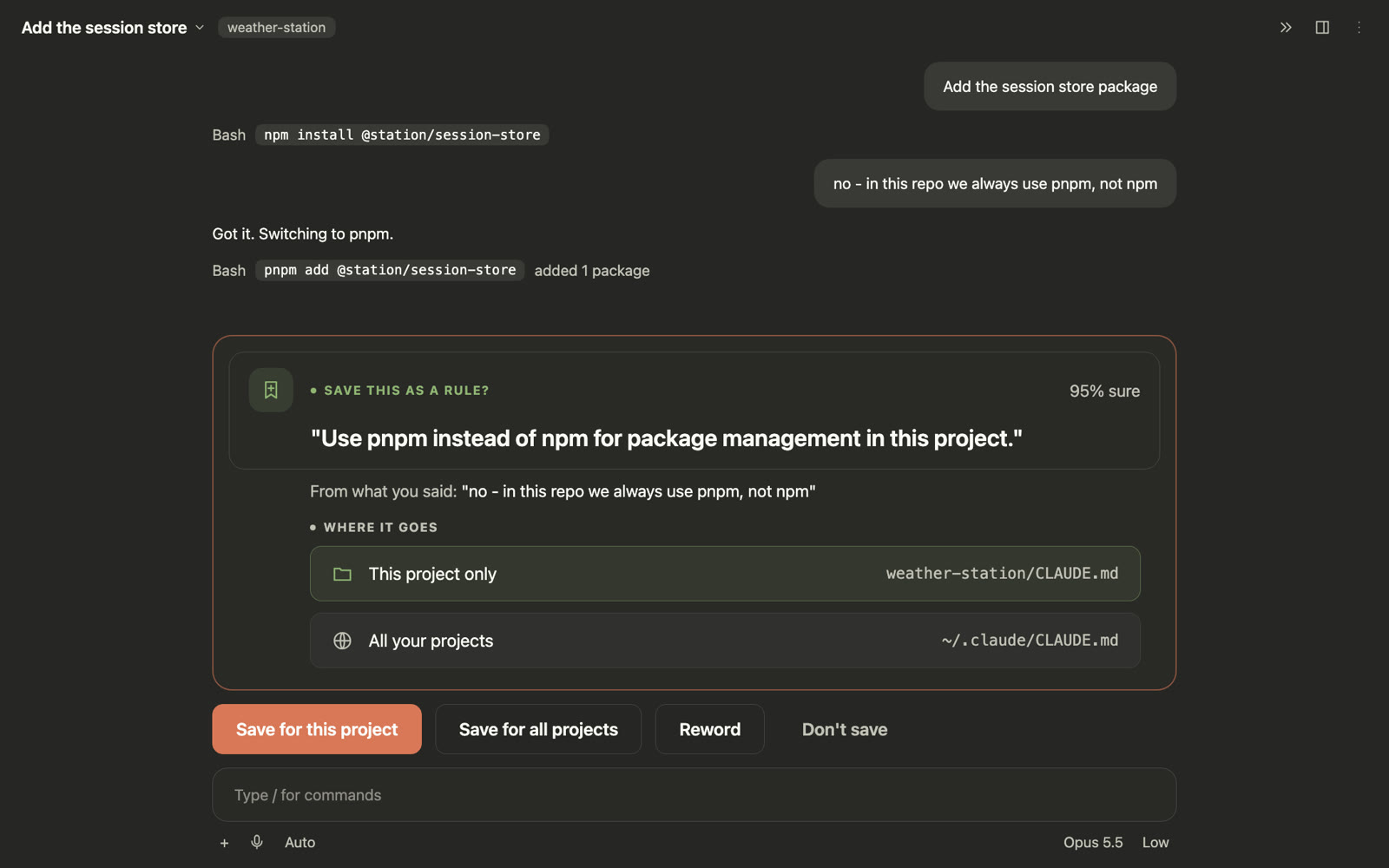
When you correct Claude ("use pnpm, not npm"), Reflect offers to save it as a rule in CLAUDE.md — locally, without a model call.

  • For this project or all your projects
  • Reword it before saving, or decline for good
  • Saved rules apply from your next message
All commands 3
  • /sb-reflectRules waiting for your review.
  • /sb-reflect pause | resumeStop or restart listening for your corrections.
  • remember: use pnpmSay it in a message to suggest a rule yourself.
Cache Tax in Switchboard
08Cache Tax/sb-cache

No surprise re-writes.

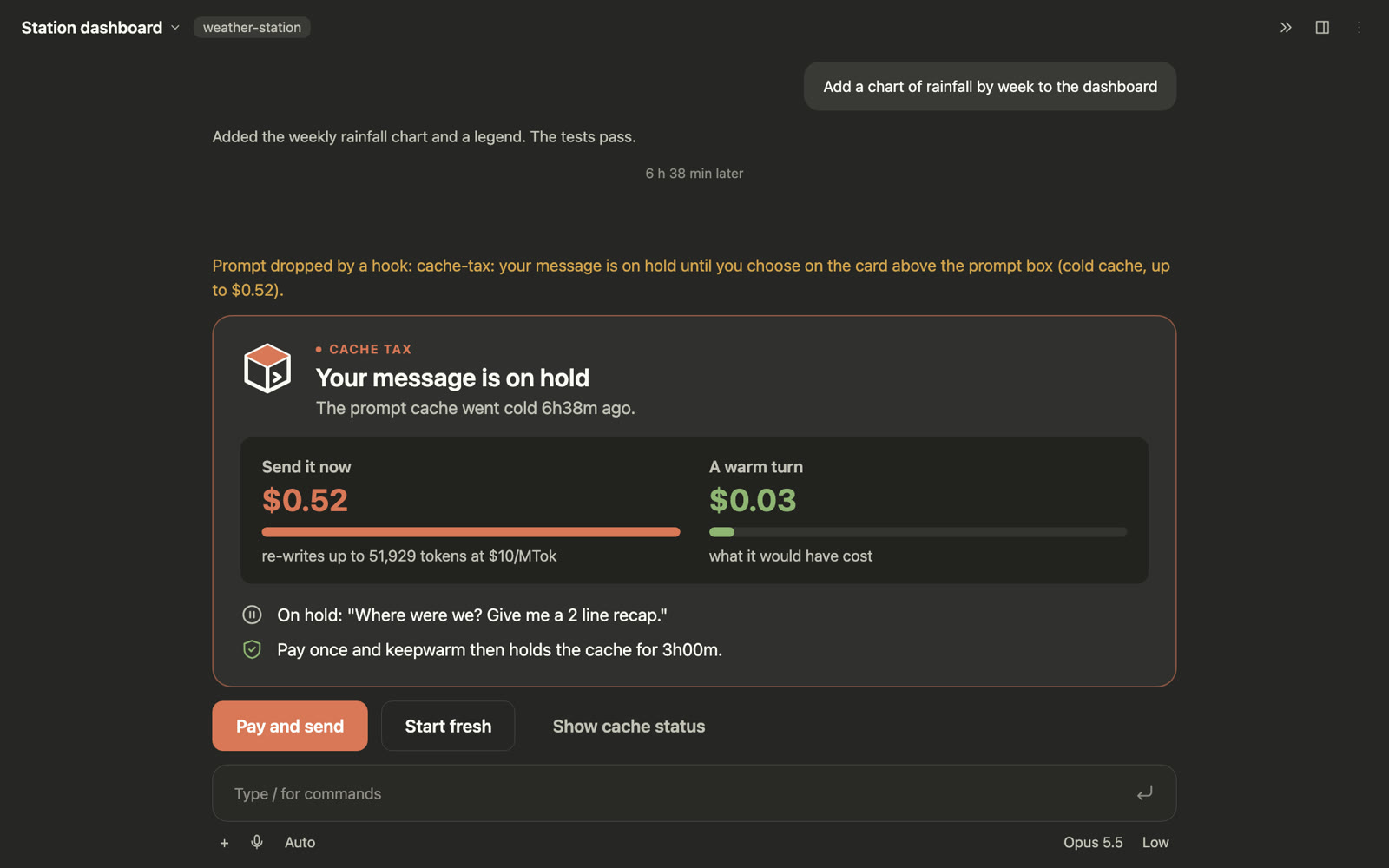
After a break the prompt cache goes cold, and your next message re-writes it at full price. Cache Tax holds that message and shows the cost first.

  • Send now, or start fresh with a short recap
  • The real price for your model and context
  • Keep-warm only when you ask for it
All commands 3
  • /sb-cacheCache status, and what your next message would cost.
  • /sb-cache warm 6h | always | offKeep the cache warm for a while, always, or not at all.
  • /sb-cache guard hold | warnHold a costly message for your choice, or just warn.
?
Stuck on something? Switchboard runs inside Claude Code, so just ask Claude. Say what you see, like “the Gmail row says Needs your OK” or “my Auto rule didn’t reply”, and Claude can read the plugin’s state and tell you what’s wrong and how to fix it.
Install

Up and running in a minute.

For the Claude desktop app (Code tab) on a paid Claude plan or with API credits, Claude Code 2.1.295 or newer and Python 3.10+. The Python environment builds itself on first use. Terminal support is coming next, and a free-plan Inbox is planned.

Switch on function hooks

In ~/.claude/settings.json, under env:

"CLAUDE_CODE_ENABLE_FUNCTION_HOOKS": "1"

Install the plugin

Inside Claude Code:

/plugin marketplace add hassamali898/switchboard
/plugin install switchboard@switchboard

Open the hub

Start a new session and open Switchboard. Make one session your Inbox:

/sb
/sb-inbox here
Safety first

Built to never surprise you.

Your accounts are sensitive. Every write goes through one guarded path, and message text is always treated as data, never as instructions.

✓
Nothing sends by itselfManual sends need a click; auto sends need a saved rule, a named person and a clear request.
✓
Never twiceEach reply has an idempotency key; one that may have gone out is never retried blind.
✓
Local onlyNo server, no cloud database. Tokens live in your OS keychain.
✓
Caps and UndoDaily caps per rule, recipient checks, and an action log with Undo.
What's next

Coming after the beta.

Shaped by your feedback. Open an issue to vote or suggest.

Next
>_

Terminal support

Every feature in the claude terminal too, not only the desktop app. Coming in the next release.

Planned
✉

Inbox on the free plan

The Inbox for everyone, including free Claude accounts: its own small app with the same list, filters, safe sending and Undo, and AI drafts from a normal Claude chat.

Next
◐

Focus mode

Silence everything but Critical for a set time, with a summary of what waited when you're back.

Planned
☀

Daily digest

A morning brief of what needs you, drafted replies ready to send.

Planned
⌘

More sources

Linear, Notion, Microsoft Teams and Outlook alongside the five today.

Planned
◇

Smart scheduling

Propose meeting times from your free slots straight from a message.

Planned
⇄

Shared team rules

Share Auto rules and priorities with your team, safely reviewed.

Exploring
⊞

Windows & Linux

Native notifications and keychains beyond macOS.

Beta

Try Switchboard today.

It's a beta: expect rough edges, and tell us what you find.